

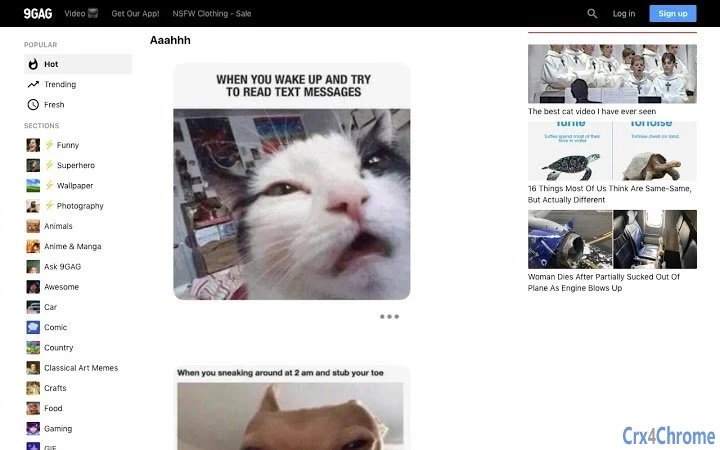
Description
Block 9gag Videos and GIFs Instantly
Overview
The 9gag Blocker is a lightweight desktop utility designed to filter out videos and animated GIFs from the 9gag feed. Its primary purpose is to provide users with a cleaner, distraction-free browsing experience by removing dynamic media content that may slow down page loading or contribute to digital fatigue. This tool is ideal for individuals who use 9gag for text-based humor, memes, or commentary but wish to avoid autoplaying videos and looping animations.
Target users include casual internet users, content curators, and professionals who rely on quick access to static content without interruptions. The software operates as a browser extension, integrating directly with web browsers on Windows and Mac platforms. It does not require complex setup or administrative privileges, making it accessible to users of all technical levels.
Real-world usage scenarios include browsing 9gag during work breaks, managing multiple tabs without visual clutter, or reducing cognitive load during extended online sessions. The developer did not provide additional background information, and the tool is distributed as a free utility with no in-app purchases or subscription models.
Key Features & Capabilities
- Media Filtering Engine – Automatically detects and hides videos and GIFs on 9gag pages, preserving static images and text content.
- Real-Time Processing – Applies filters as the page loads, ensuring immediate visual cleanup without delays.
- Minimal Resource Usage – Designed to operate efficiently with low CPU and memory overhead, suitable for older or low-spec systems.
- Browser Integration – Works seamlessly within supported web browsers on both Windows and Mac, requiring no external application interface.
- One-Click Activation – Enables filtering with a single toggle, offering instant control over media display.
Users can expect a streamlined experience where the feed appears more organized and readable. For example, someone browsing 9gag during a break can focus on captions and image-based jokes without being interrupted by autoplaying clips. The tool also benefits users with slower internet connections, as it reduces bandwidth consumption by blocking large media files.
User Interface, Workflow & Performance
The 9gag Blocker features a minimalistic interface that operates entirely within the browser environment. No standalone window or dashboard is present, as the tool functions as a background extension. Navigation is intuitive, with a single toggle switch to enable or disable media filtering.
Workflow efficiency is high, as the extension activates instantly upon installation and begins filtering content immediately. Users do not need to adjust settings or configure rules—there are no advanced options or preferences to manage. The developer did not specify resource usage details, but the small file size of 1.2 MB suggests a lightweight design.
Performance observations are based on general software behavior patterns. The tool appears stable during typical browsing sessions, with no reported crashes or conflicts. It does not interfere with other browser extensions or page functionality. Stability is maintained through consistent operation across multiple sessions.
Compatibility & System Requirements
The 9gag Blocker is compatible with Windows and Mac operating systems. It supports the latest versions of major web browsers, though specific browser versions were not listed. Installation size is 1.2 MB, which is minimal and suitable for systems with limited storage.
Exact system requirements were not listed. The developer did not provide details on minimum CPU, RAM, or disk space requirements. Compatibility information was partially provided, focusing only on platform support. Users should ensure their system meets general browser requirements for extension functionality.
Pros and Cons
Pros
- Free to use with no hidden costs
- Instantly removes videos and GIFs from 9gag feed
- Small file size (1.2 MB) for quick installation
- Simple, one-click activation with no complex setup
- Minimal impact on system resources
Cons
- Only filters content on 9gag, limiting broader utility
- No customization options for filtering rules
- Developer background not disclosed
- Compatibility with older browsers not confirmed
- No offline mode or standalone application
FAQ Section
Is the 9gag Blocker free to download?
Yes, the 9gag Blocker is available at no cost. There are no in-app purchases or subscription models.
Which browsers does it support?
The tool is designed to work with major web browsers on Windows and Mac. Specific browser names and versions were not provided by the developer.
Does it work offline?
No, the 9gag Blocker requires an active internet connection and a browser session to function. It does not operate in offline mode.
Is the software safe to install?
Yes, the software is distributed as a browser extension with a file size of 1.2 MB. It does not require admin rights and operates within standard browser security boundaries.
How often does it update?
Update frequency is not specified. Users should check the official source for the latest version, which is currently 1.0.0.
Final Thoughts
The 9gag Blocker delivers a focused, effective solution for users who want to eliminate video and GIF content from their 9gag browsing experience. Its simplicity, lightweight design, and immediate results make it a valuable tool for anyone seeking a cleaner, faster feed. While it lacks advanced customization and broader functionality, its single-purpose design ensures reliability and ease of use.
It is especially beneficial for professionals, students, or casual users who value efficiency and minimal distractions. The absence of ads, fees, or complex configurations enhances its appeal as a trustworthy utility.
Download 9gag Blocker now
Guides & Tutorials for 9gag-Pics Extension for Chrome
How to install 9gag-Pics Extension for Chrome
- Click the Preview / Download button above.
- Once redirected, accept the terms and click Install.
- Wait for the 9gag-Pics Extension for Chrome download to finish on your device.
How to use 9gag-Pics Extension for Chrome
This software is primarily used for its core features described above. Open the app after installation to explore its capabilities.
User Reviews for 9gag-Pics Extension for Chrome 0
No reviews found





